Terlihat gambar renders terbaru dari Samsung Galaxy Note 7 dengan Dual curve
Banyak yang menayakan kenapa selalu Samsung Galaxy Note 7 yang di sebutkan dan Samsung Galaxy Note 6 kemana? sebagai jawaban dari hal itu disini di perjelas bahwa kabarnya memang pihak Samsung melompati satu seri dan langsung ke seri 7 karena device ini akan di rilis pada akhir tahun dan kemungkinan penjualan pada 2017 jadi dengan demikian seri terbaru Galaxy Note 7 lah yang mengisi dari seri terbaru keluarga Note, dan terbarunya kali ini adalah di perlihatkan sebuah renders yang menampakan dimensi dari device ini dengan kemampuan layar lengkung atau dual curve.
Seperti yang terlihat diatas kemungkinan device ini adalah seri edge dari Galaxy Note 7 yang pada bagian layarnya identif dengan layar melengkung, untuk dimensi sendiri masih terlihat agak sama saja seperti pendahulunya, tetapi yang menariknya adalah bahwa di renders tersebut terlihat tidak ada kemampuan dual kamera yang sudah di sebutkan di beberapa waktu yang lalu, atau mungkin dual kamera akan di sertakan di variant lain dari Samsung Galaxy Note 7? untuk hal ini hanya pihak Samsung lah yang bisa menjawabnya.
Dan juga pada renders ini kemungkinan besar bisa berubah untuk design finalnya nanti karena untuk sekarang masih terlalu dini untuk menarik kesimpulan dari design akhir device ini karena, seperti yang sudah di katakan bahwa device ini akan di perkenalkan secara resmi pada awal Agustus mendatang, jadi masih masuk akal jika perubahan akan terjadi pada hasil akhirnya nanti.
Galaxy Note 7 ini akan di bekali kemampuan dapur pacu yang cepat dari Qualcomm Snapdragon terbaru mungkin seri 823, di bekali RAM 6GB, kemampuan layar lengkung dan dual kamera pada salah satu versi variantnya, dan juga kualitas layar QHD yang nantinya akan di bekali dengan panel Super AMOLED.
sumber twitter
Video resmi teaser OnePlus 3 sudah terlihat
Salah satu device yang paling banyak di tunggu orang di banyak negara dan terkhusus pada fansnya sendiri sebentar lagi akan tampil dan menunjukan taringnya pada perilisan resminya pada tanggal 14 Juni mendatang, dan kabar ini sudah resmi di konfirmasi oleh vendir OnePlus sendiri.
Seperti kebanyakan device baru dari beberapa vendor besar, pihak OnePlus juga baru saja memperlihatkan video teaser dari device unggulan mereka yang terbaru, secara umum memang tidak terlihat bentuk detail dari device tersebut, dan seperti kebanyakannya hanya menunjukan siluetnya saja, tetapi hal ini cukup untuk menarik dan membuat banyak penggemar OnePlus menjadi penasaran akan device yang di gadang-gadang menjadi salah satu yang terbaik pada tahun ini.
Secara keseluruhan memang benar device ini akan tampil sangat atraktif, disamping membawa design yang elegant namun kokoh berbalut dengan material metal yang kokoh, selanjutnya device ini akan benar-benar powerfull karena di dukung oleh dapur pacu Qualcomm Snapdragon 820, dan kebarnya versi 6GB RAM juga di sertakan pada salah satu variant dari OnePlus 3 ini.
Untuk harga sendiri dikabarkan device ini akan di jual mulai dari harga $350 atau sekitaran Rp.3.700.000 mungkin untuk versi RAM 4GB dan versi 6GB di jual dengan harga yang lebih tinggi, dan juga di kabarkan device ini akan di hadirkan dengan 4 versi variant yang berbeda sesuai spesifikasi masing-masing.
sumber youtube
Disebutkan perkenalan resmi Samsung Galaxy Note 7 digelar pada awal Agustus
Banyak orang yang menanyakan terkait jadwal perilisan resmi Samsung Galaxy Note 7, meski demikian beberapa waktu lalu juga sudah sempat beredar rumor yang mengatakan bahwa device ini akan resmi di perkenalkan pada bulan Agustus nanti, tetapi dalam rumor tersebut tidak ada indikasi yang kuat terkait ke akuratan informasi tersebut.
Dan untuk sekarang ini rumor tersebut sudah semakin di perkuat dengan sebuah tweet dari akun @evleaks yang dalam beberapa informasi yang di bocorkannya mendapat keakuratan yang tinggi, jadi dengan datangnya berita ini kita sudah mendapat satu buah kejelasan bahwa kemungkinan besar device ini benar-benar akan resmi di perkenalkan pada bulan Agustus nanti.
Dalam tweet tersebut di katakan bahwa device ini akan hadir dalam waktu 2 bulan dari sekarang, jadi dengan demikian dapat kita simpulkan bahwa device ini akan hadir pada awal Agustus atau minggu pertama di bulan Agustus, dan itupun kalau tidak ada perubahan jadwal yang di lakukan Samsung.
Perlu kalian ketahui bahwa Samsung Galaxy Note 7 adalah device yang akan menggantikan seri Galaxy Note 6 yang kabarnya memang sengaja di lompati vendor Samsung, untuk spesifikasinya sendiri bahwa di kabarkan device ini akan hadir dengan processor Qualcomm Snapdragon dan Exynoss versi terbaru, RAM 6GB dan juga di bekali kemampuan Dual Kamera di salah satu variantnya nanti, benar atau tidak berita ini kita hanya bisa menunggu kejelasan resminya saja lagi dari vendor Samsung.
sumber twitter
Fitur Stamina Mode di kembalikan pada update terbaru untuk keluarga Xperia Z5
Setelah banyak orang yang menyayangkan hilangnya fitur Stamina Mode pada jajaran update terbaru Xperia Z5 pada firmware berbasis Marshmallow, untuk menjawab kekecewaan banyak orang sekarang fitur yang di hilangkan tersebut telah di kembalikan vendor Sony pada update firmware terbaru dengan build number 32.2.A.0.224, untuk semua jajaran variant Sony Xperia Z5.
Kabar ini banyak mendatangkan respon positif dari berbagai penggemar device Sony Xperia, karena tidak dapat disangkal fitur ini benar-benar berguna dalam mengurus sumber daya baterai yang akan membuat baterai tahan lebih lama dengan pengaturan manajemen daya yang sangat baik.
Untuk kemampuan Stamina Mode yang kembali di hadirkan ini, akan sama saja seperti yang ada pada firmware terdahulu, fitur dan kemampuannya pun masih di katakan sama, tetapi hal baiknya adalah dengan di kembalikannya fitur ini daya tahan baterai pada jajaran variant Xperia Z5 akan menjadi lebih baik, dan sekaligus dapat di pantau keakuratan prediksi daya tahan baterai untuk beberapa wak tu kedepan.
Untuk sekarang masih belum ada konfirmasi yang menyatakan fitur ini akan kembali di hadirkan pada firmware Xperia terbaru pada jajaran Sony Xperia lainnya, tetapi ada indikasi kuat bahwa fitur ini akan di kembalikan lagi ke semua device Xperia pada firmware yang baru di gulirkan yang berbasis pada Android Marshmallow.
sumber xperiablog
Nokia Lumia 730 Latest USB Driver For Windows Free Download
Nokia Lumia 730 Dual SIM which is a yield of items from sellers Nokia is the Nokia Lumia last item before its obtaining by Microsoft stock cell phone. In this arrangement needs to sort twofold sim card or can say as double sim card. With this model, all cell phone clients can introduce twofold sim cards in one telephone. Months of the dispatch of the Nokia Lumia 730 Dual SIM which in September 2014 and is presently circling in Indonesia and including the cost of the Nokia Lumia 730 Dual SIM is additionally accessible. This telephone is the assignment for the upper-white-collar class buyers since this telephone is all Future, determinations are very high.
Nokia Lumia 730 Dual SIM Features.
Nokia Lumia 730 utilizations a piece of candy configuration with a model which has measurements measuring 134.7 x 68.5 x 8.7 mm and weight of 130 grams of this advanced mobile phone. For the screen measure, the Nokia Lumia cell phone has a size of 720 x 1280 pixels, 4.7 inches (~ 316 PPI pixel thickness) that utilization this sort of showcase sort OLED capacitive touchscreen, 16M hues. With this kind of presentation that is being used, will deliver a pleasant diagram.
For an assortment of hues that fill the Lumia 730 Dual Sim cellular telephone, there are numerous shading alternatives for your unwavering clients Nokia, the decision of shading is Orange, green, white, and dark.
Download Nokia Lumia 730 Dual SIM Pc Suite incorporates likewise Usb Driver and Firmware for Windows clients. By downloading the product, you will have the capacity to interface your gadget to a PC or tablet to share information, change documents, reinforcement your telephone, including contacts, logbooks, and the sky is the limit from there. The product is anything but difficult to utilize and allowed to utilize.
Instructions to introduce this Pc Suite and Usb Driver programming?
1. Download the setup record and basically, run it. For clients of Windows Vista and Windows 7 needs to run the setup document as an overseer (right tap on the record and afterward click "Keep running as chairman"). On the off chance that you skirt this progression, the driver may not introduce the product accurately.
2. After setup to finish, interface your gadget to a PC by means of the UBS port. Sit tight a couple of minutes for your PC to distinguish the gadget programming.
3. Congrats! You have effectively introduced the Nokia Lumia 730 Dual SIM Pc Suite and Usb driver! Appreciate! On the off chance that you have remarks or inquiries concerning the rules and guidelines of this, let us know instantly.
Note: These drivers are compatible for major PC operating systems such as Windows 7 and 8. Download the drivers and enjoy.
Download (Direct)
Download (MediaFire) Note: If above driver doesn't work. Then download this one.
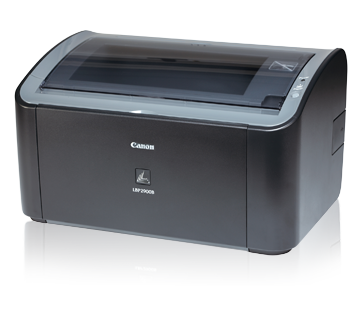
Canon LBP 2900B Latest Drivers For All Windows 64-Bit And 32-Bit Free Download
Hello! Welcome to the best place for downloading drivers of your different electronic drivers. We promise, we claim and then we do provide our users with the help driver that they want for their electronic devices such as phones, laptops, tablets, different boxes, printers and many others. Today, I am going to give you the drivers for your Canon LBP 2900b printer. These drivers are compatible with Windows 7, 8, and 8.1 and you can enjoy the best printing experience by installing these drivers. You can download the drivers from the links given at the end of this post but first, it is better to read something about the features and performance of this printer.
This printer has a lot of key benefits. It does 12 ppm mono printing which is really a great benefit. Also, the warm-up time from sleep mode is 0 on this wonderful printer. It gives you one of the best print out times which 9.3 seconds. It has a very impressive resolution of 2400x600 dpi. Energy efficiency and the way it works silently are one of the major benefits on Canon LBP 2900b. It has a very easy to use all in one cartridge and that's why most people prefer it over many other printers.
This reduced desktop laser printer conveys proficient prints immediately. Simple to utilize, calm and vitality effective, it is the ideal mono printer for the individual office.
Get prints the minute you require them without holding up. This keen, desktop printer conveys your reports at a pace of 12 pages for every moment. There's zero warm-up time from rest mode because of our On-Demand altering innovation.
The advantage from fantastic yield with sharp content and clear illustrations, because of a print determination up to 2400 x 600dpi. The 150-sheet multi-reason plate guarantees adaptable paper taking care of.
Save money on influence costs as this vitality effective and naturally agreeable printer utilizes just 2 watts as a part of rest mode. Besides, calm operation you can focus completely on your work.
The All-in-One cartridge decreases support prerequisites and guarantees persistent astounding yield. Basically, supplant the conservative cartridge - containing toner, drum and cleaning units - and the printer is just about tantamount to 'new'.
Offer laser printing between every associated desktop in your office with the discretionary AXIS 1650 Print Server. The establishment is snappy and simple, changing the i-SENSYS LBP2900/2900B into a profitable system printer.
1. To download records, tap the document join, select [Save], and determine the registry where you need to spare the file.The download will begin consequently.
2. Downloaded records are spared in the predefined organizer in a self-separating design (.exe group).
3. Double tap the records to decompress them. Another envelope will be made in the same folder.The new organizer will have the same name as the packed document.
4. Double tap the decompressed Setup.exe record to begin establishment.
Download (32-Bit)
Download (64-Bit)
Champcash: make money with your Android Device
I came across this Android app called Champcash (100% free networking application) with which you can earn cash using your android device.
Getting Started
To get started or become a publisher, all you have to do is download and install the champcash app, complete your challenge and earn cash by inviting your friends to use champcash. All for free, you don't have to pay any startup fee.
How does Champcash work?
• Download and install Champcash here
• Sign up with champcash using this sponsor id 3949350
• Take on the challenge
Immediately after sign up, Taking on the challenge requires you install about 8-10 apps on your android device and open them one by one for about 1min.
• You will be given a referer id
•Earn when you refer champcash to your friends by clicking on " invite to earn"
The more friends you refer, the more cash you earn. You can also promote your referral link on social media. Ask your friends to install all the apps in the challenge and open them one by one for 1min each to enable you get your payout.
• Download and install Champcash here
• Sign up with champcash using this sponsor id 3949350
• Take on the challenge
Immediately after sign up, Taking on the challenge requires you install about 8-10 apps on your android device and open them one by one for about 1min.
• You will be given a referer id
•Earn when you refer champcash to your friends by clicking on " invite to earn"
The more friends you refer, the more cash you earn. You can also promote your referral link on social media. Ask your friends to install all the apps in the challenge and open them one by one for 1min each to enable you get your payout.
How To Withdraw Your Cash
There are 3 Ways
1.Paypal / Bank Transfer: You can Withdraw Your cash through Paypal or Bank Transfer.
2.International Mobile Recharge: You can Withdraw your cash by recharging any mobile number internationally.
3.E-Gift Cards: You can withdraw your cash through E-Gift cards of Amazon,Flipkart,etc.
What are you waiting for?, download champcash now and start earning.
الاشتراك في:
الرسائل (Atom)